Test your students before, during and after tutoring and create learning plans
Testing and Learning Plans
Testing in TutorFirst & Creating Learning Plans
SAT and ACT test, Testing and Learning Plans – As I’m sure you know, testing your students before tutoring is essential. That’s why, in TutorFirst, you can test your students with the Achieve test or free SAT & ACT practice tests. As a result, you will know where they are before tutoring starts.
On the other hand, if you want to, you can add your own test to be graded in TutorFirst for a standard percentage score.
Additionally, you can record results of tests taken and graded elsewhere. Either way, you will find it easy to manage testing your students and reporting on results. Then, creating a student learning plan.
For example, there are three unique ways to administer or record tests & grades:
Online Testing
You can use the interactive online version of the Achieve tests to test your students online. To clarify, this can be online with the tutor present, or sent to your student’s home.
Your team will find that Test Prep testing is easy with a free SAT & ACT practice test. You can administer the test in person or online with our Virtual Bubble sheet.
Create your own online tests, adding questions, graphics, answer options and passages. A simple answer key will grade the test when submitted by your student.
Graded Tests
Of course, there are many instance where your students will need to take a test on paper. In other words, if your student is using a paper test, you will need to grade it. Good news, we can also help you with that:
Achieve test taken on paper graded by TutorFirst
A free practice SAT or ACT test given on paper graded by TutorFirst
Add your own test for grading in TutorFirst
Record Results
Record student scores for any test graded elsewhere.
Additionally, you can program grades, levels, quartiles etc, to assign to a recorded test.
TutorFirst partners with Achieve to offer student assessments in Language Arts and Math. Additionally, you can administer the test in person or set it for online.
By using the Achieve Tests in conjunction with TutorFirst you can generate an automatic targeted learning plan from the student’s test results.
For example, test results are generated and then grouped by benchmarks and objectives. TutorFirst can compare the student’s pre and post tests and report on the gains.
Please note Achieve is subject to an additional per test charge.
Achieve Validity Report
If you will be applying for government contracts where Achieve will be used you can contact us for RFA information.
To assist you with test prep tutoring TutorFirst has programmed the individual scoring algorithms for many SAT & ACT practice tests.
ACT
To assist you with test prep tutoring TutorFirst has programmed the individual scoring algorithms for many SAT & ACT practice tests.
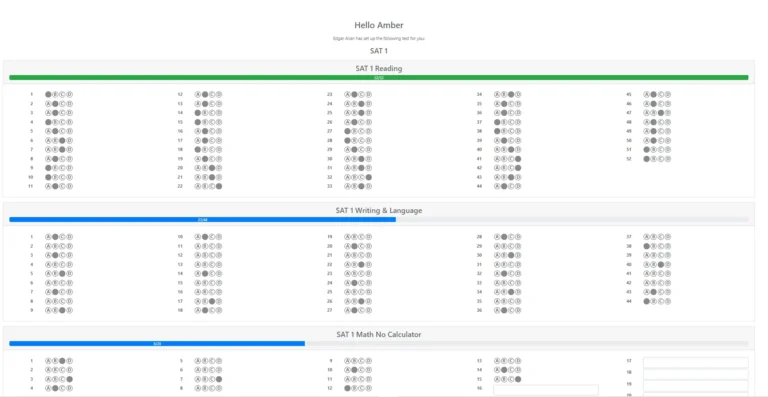
Virtual Bubble Sheets
If you don’t want to enter answers, your student can do it directly. Alternatively, your staff can enter answers too:
Your admin team enter the student answers into TutorFirst for scoring
Send a virtual bubble sheet to the student to enter the answers directly
To assist, TutorFirst has created a virtual bubble sheets for each SAT & ACT test in TutorFirst.
You have a choice on how you use the bubble sheet. You can email the virtual bubble sheet link to the student to complete the test or you may prefer to activate it on a local computer. To clarify, it all depends on who is the proctor.
Either way, you will save valuable test input time for tutors as students submit their answers directly to TutorFirst for scoring and reporting.
You will find a sample of a virtual bubble sheet for SAT & ACT practice test below.
Testing Dates
Learning Plans
To help you with consistency across your tutoring staff regarding testing and learning plans, you can create automatic targeted learning plans from Achieve Test results.
Most importantly you can create custom learning plans at any time without testing or recording test results if you need to. That is to say, you don’t need to use Achieve to create a Learning plan. You can even copy a learning plan from one student to another in the same group.
Furthermore, you will find it easy to add your own goals for learning plans. For example, organization skills etc.
You may find samples of many of the documents produced by TutorFirst on the Samples page.
Press Play
Video
Your customers will find it easy to filter tutors and book a session. What’s more you and the tutor will be notified of any new booking.