Create pay groups with multiple pay rates. Never miss a session for pay, never pay for a session that did not happen
Tutor time payment – Payroll
Tutor Payroll Calculations: Managing Tutor Time Payment
Tutor time payment is automatically calculated by TutorFirst for your tutoring payroll! That is to say, create a session, and TutorFirst assigns the rate.
Furthermore, you can have different tutor pay for doing different things.
Let’s dive a little deeper!
Tutor time payment – Payroll
Periods
Payroll Periods
We calculate Tutoring payroll using your payroll periods. For example, these are the payroll periods you can choose:
Monthly – standard
Monthly – offset
Twice per month
Weekly
Every two weeks
Tutor time payment – Payroll
Rates
Pay Groups
Pay Groups form the framework of where you will set your tutor pay rates. Most importantly, you can create as many pay groups as you need. However, you can assign a pay group to multiple tutors, streamlining the process for managing tutor time payment.
So, if you pay them the same for doing the same thing you can assign the same pay group.
Each pay group contains a table of your services:
You can set a different rate for each service
One rate rate for everything
A combination of the above
A minimum pay amount you have guaranteed
Or a a set tutor pay amount. Regardless of the duration, this is what you get!
Student Rate
So what happens if you have an outlier? Simple, you can program an override rate into a student record.
Furthermore it’s flexible. That is to say we will use the override for a particular tutor, or a particular session type. Even a combination of those factors.
Tutor time payment – Payroll
Total
Running Total
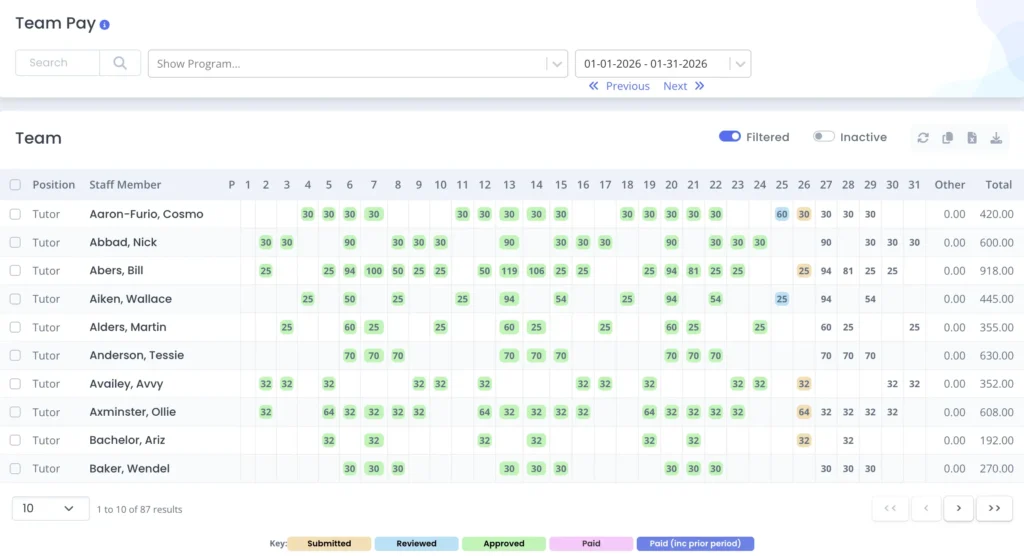
As soon as you have a session we calculate the anticipated rate. Therefore, you can look and check everything for tutor time payment to ensure the payroll is accurate.
TutorFirst collates all the sessions per staff member, per pay period. Most importantly, we will add a session’s pay to the tutor payroll running total only when you approve it.
As a result this prevents errors entering into your tutoring payroll. Furthermore, we lock an approved session, so your tutor cannot then make changes. Subsequently, no over payments, accidental or deliberate are made.
Bonuses
You can add bonuses to your payroll prior to close out.
Simply set these up beforehand for one click application as you close out your tutor payroll.
Reimbursements
Additionally, you can make manual adjustments to a tutor’s pay. Perhaps you reimburse for mileage or supplies!
Each session in TutorFirst has a reimbursement field, so you can add an amount and TutorFirst keeps track. Therefore, when you want to close out payroll, just pull your reimbursement figures. Finally, add them to your tutor pay.
Tutor time payment – Payroll
Export
Export
Finally, you will close out your payroll period. In other words, calculate the gross payroll for each staff member.
Then export it to a payroll company. Alternatively, you can send it to an internal department for withholding and payment.
To do this you can opt to use one of the many custom export formats for most of the major payroll processing companies.
Tutor time payment – Payroll
Carry Over
Late Sessions
Naturally, we will not include sessions that are not approved in time in the gross totals. As a result, these late sessions will be paid when you approve them. Don’t worry TutorFirst carries them forward for you.
Depending on your tutoring rules you can handle these in two ways:
Carry forward one period only. For instance, you give one payroll period for your staff to catch up.
All period carry forward. For example, you wish to pay the session when it’s approved regardless of interim.