
How to Manage Tutor Schedules: A Guide for Tutoring Businesses with Multiple Tutors
October 4, 2026 2026-10-07 14:07How to Manage Tutor Schedules: A Guide for Tutoring Businesses with Multiple Tutors
How to Manage Tutor Schedules: A Guide for Tutoring Businesses with Multiple Tutors
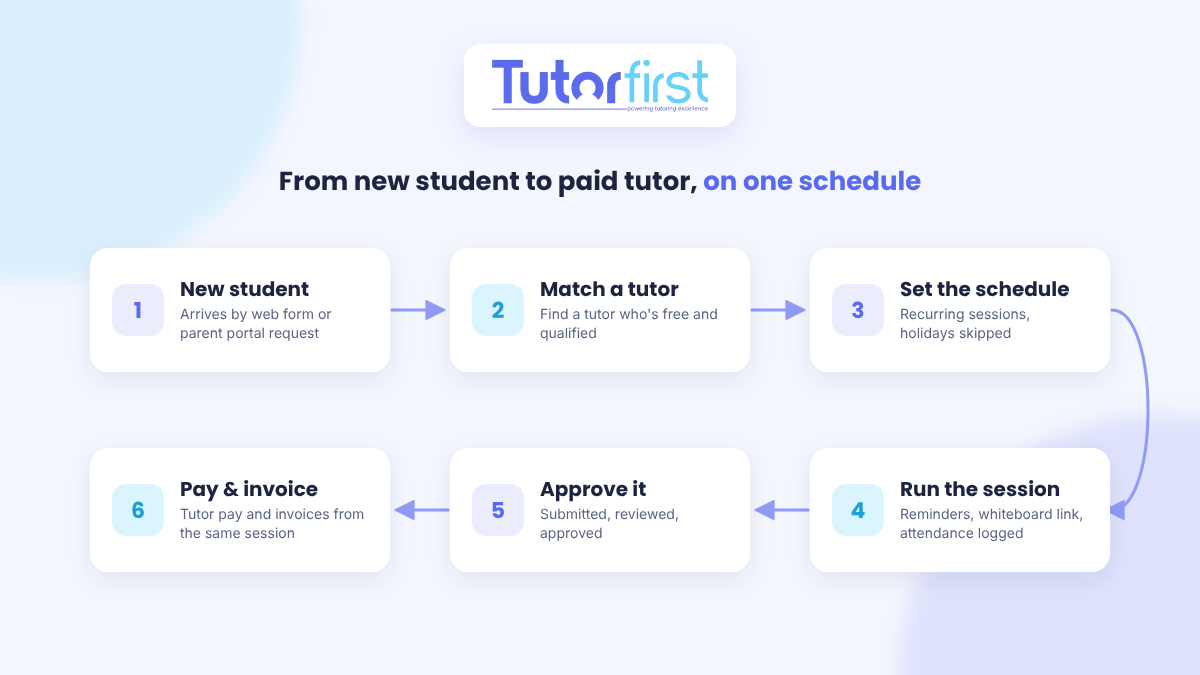
To manage tutor schedules across a team, you need one system that matches the right tutor to each student, keeps recurring sessions up to date, and turns every completed session into accurate attendance, invoices and tutor pay. Tutoring scheduling software does the cross-checking that owners otherwise do by text, email and spreadsheet, so adding tutors doesn’t mean adding hours of admin.
This guide walks through the scheduling problems that show up once you manage more than a couple of tutors, and how each one gets solved in practice.
Why scheduling gets harder with every tutor you add
With one tutor, scheduling is a calendar. With ten, it’s a matching puzzle that changes every week. Each new tutor adds their own subjects, availability, travel limits and pay rate, and each new student adds their own needs and timetable. The problems that follow are predictable:
- Matching: finding a tutor who teaches the right subject and level, is free at the right time, and can get to the student (or works online).
- Availability: tutors’ real availability lives in their heads, their phones and a string of text messages.
- Change: recurring sessions need to move, holidays need skipping, and substitutes are needed at short notice.
- Proof: you need to know which sessions actually happened, and for how long, before you bill a family or pay a tutor.
- Communication: tutors, students and parents all need to know where to be and when, and parents want to see progress.
How scheduling software solves each problem
Here’s how each of those problems is handled in TutorFirst. Other tools vary, but these are the jobs any scheduling system for a multi-tutor business needs to do.
1. Setting up recurring sessions in a few clicks
Most tutoring is recurring: the same student, the same tutor, the same time each week. In TutorFirst, a schedule is a group of recurring sessions between a tutor and a student (or a group of students). You pick the days, times and durations, and the sessions are created for you. If something changes, you can update every session in the schedule at once instead of editing them one by one.
Holidays are handled automatically. You can load your country’s holiday calendar, add your own closure days, and sessions skip those dates when the schedule is created. One-off sessions, such as a trial, a test or a make-up session, can be added separately and linked to an existing schedule. See student scheduling and attendance.
2. Finding the right tutor for each student
Matching is where most owners lose time. Intelligent Tutor Match filters your tutors by:
- Availability, including tutors’ linked Google or Microsoft calendars, so personal appointments are taken into account
- Distance from the session location
- Subjects taught
- Specialist skills, such as experience with dyslexia
- Preferred student ages
- Feedback star rating
Results also show how many hours each tutor already has scheduled, so you can spread work fairly instead of overloading your most reliable people. This is especially useful for emergency substitutes, when a tutor changes, or when a student adds a new subject.
3. Filling new students without phone tag
When a new student signs up, the usual routine is to text tutors one at a time until someone says yes. Schedule Bid replaces that. You create the job (a single session or a full schedule), and TutorFirst filters your tutor list by subject and level, and by location and each tutor’s maximum travel distance if the session isn’t online. You can narrow it further by availability, specialist areas, online permissions or rating.
Matching tutors get an email invitation with the job details, or you can post the job to the Job Board in the tutor portal, where tutors can compare open jobs side by side. Tutors accept or decline, every reply is tracked in one place, and you’re notified as answers come in. You stay in control of who gets the job: assign the first tutor to accept, wait for more replies, or let the family choose from the top responses.
4. Letting parents request sessions
Not every family wants the same slot every week. Through the customer portal, parents can request sessions on the days and times that suit them. An admin assigns a tutor and confirms the session, and it can be linked to the student’s existing schedule. Requests arrive in the system instead of your inbox, so none of them get lost.
5. Seeing the whole business on one calendar
With several tutors, you need to see the schedule from different angles. Every session appears on the central calendar, the student’s calendar, the staff calendar and the lane calendar, as well as in session and schedule lists and the student’s record. Office staff, tutors and owners all look at the same data instead of their own copies.
6. Getting everyone to the session, in person or online
Session reminders go out by email. For online tutoring, TutorFirst works with Pencil Spaces and Lessonspace: a whiteboard space is created at the same time as the schedule, with one space and one link per tutor and student, and the link is sent automatically with the reminders. For a last-minute session, a meeting link can be created instantly.
7. Tracking attendance without chasing timesheets
Attendance is logged automatically when a tutor closes out a session, so there’s no separate timesheet to collect. If you need exact times, check-in and check-out records when students and tutors arrive and leave. Tutor time can also differ from student time. For example, a one-hour session can count as an hour for the student and 75 minutes for the tutor to cover prep.
From there, you can see total hours, monthly hours, hours per service, billable time, and billed versus unused hours for each student, plus tutor hours by month and by payroll period.
8. Approving sessions before money moves
Every session has a status. By default, the tutor submits it, a supervisor reviews it, and an admin approves it. You can add your own status steps and have them trigger emails to the family, student or tutor. If you need proof a session took place, parents can sign electronically to confirm it.
9. Turning sessions into tutor pay and invoices
This is where good scheduling saves the most money. With TutorFirst payroll, each session’s pay is calculated from the tutor’s pay group, which can set different rates per service, a flat rate, minimum pay or fixed pay per session. A session’s pay is only added to the payroll total once you approve it, and approved sessions are locked so they can’t be changed afterward. That protects you from accidental (or deliberate) overpayments. Payroll can run monthly, twice a month, weekly or every two weeks, and exports in formats that work with payroll providers.
On the billing side, invoices can be created in advance from the schedule, or in arrears after sessions have taken place. Either way, the schedule is the starting point, so billing and pay both come from the same record of what happened.
10. Keeping parents in the loop
When tutors close out a session, they add notes (from templates if you like), log any homework in the assignment tracker, and can send an automated email to the parent. Those notes roll up into progress reports for any date range, and parents can see sessions, attendance and assignments in their portal.
One week, before and after
Here’s how a typical week might look for a tutoring business with ten tutors, first on spreadsheets and texts, then on scheduling software:
| Situation | Spreadsheets and texts | Scheduling software |
|---|---|---|
| New student needs algebra on Tuesdays | Text tutors one by one and wait for replies | Send a Schedule Bid to qualified, available tutors and assign from the replies |
| A tutor calls in sick | Scroll through contacts looking for someone free | Run Tutor Match for a substitute who is available and teaches the subject |
| A school holiday falls on Monday | Cancel and rebook each session by hand | Sessions skip the holiday automatically |
| A family wants to change their time | Edit every future session on the calendar | Update the whole schedule at once |
| End of the pay period | Collect timesheets and add up hours | Approve sessions, and pay is already calculated |
| A parent asks how their child is doing | Search through notes and email threads | Pull a progress report for any date range |
What to look for in tutor scheduling software
If you manage a team of tutors, check that any scheduling software you consider can:
- Create recurring schedules and change them in bulk
- Match tutors by subject, availability, location and special skills
- Check tutors’ personal calendars, not just the hours they entered once
- Offer new jobs to several tutors at once and track who accepts
- Log attendance automatically when a session is closed out
- Require approval before a session counts toward pay or billing
- Calculate tutor pay and invoices from the same session records
- Give parents a portal to request sessions and see progress
Frequently asked questions
How do I schedule tutors who all have different availability?
Keep availability in one system instead of in messages, and use software that checks it for you. In TutorFirst, Intelligent Tutor Match reads each tutor’s availability, including their linked Google or Microsoft calendar, and only shows tutors who are free when the student needs a session.
Can parents book their own tutoring sessions?
They can request them. Parents submit session requests through the customer portal, and your office assigns a tutor and confirms. That keeps families flexible while you stay in control of which tutor is booked.
How do I track tutor hours for payroll?
Let the sessions do it. When a tutor closes out a session, attendance is logged, and once you approve the session, its pay is added to that tutor’s payroll total for the period. There are no timesheets to collect or add up.
What happens when a tutor needs a substitute?
Run a quick match for that session. Tutor Match shows tutors who are available, teach the subject and are closest to the session location (or work online), along with how many hours they already have scheduled, so you can pick a substitute in minutes.
Want to see how this would work with your own tutors and schedule? Explore TutorFirst’s scheduling tools or book a demo.