
Tutoring CRM: How to Turn Inquiries into Enrolled, Paying Students
October 6, 2026 2026-10-07 14:07Tutoring CRM: How to Turn Inquiries into Enrolled, Paying Students
Tutoring CRM: How to Turn Inquiries into Enrolled, Paying Students
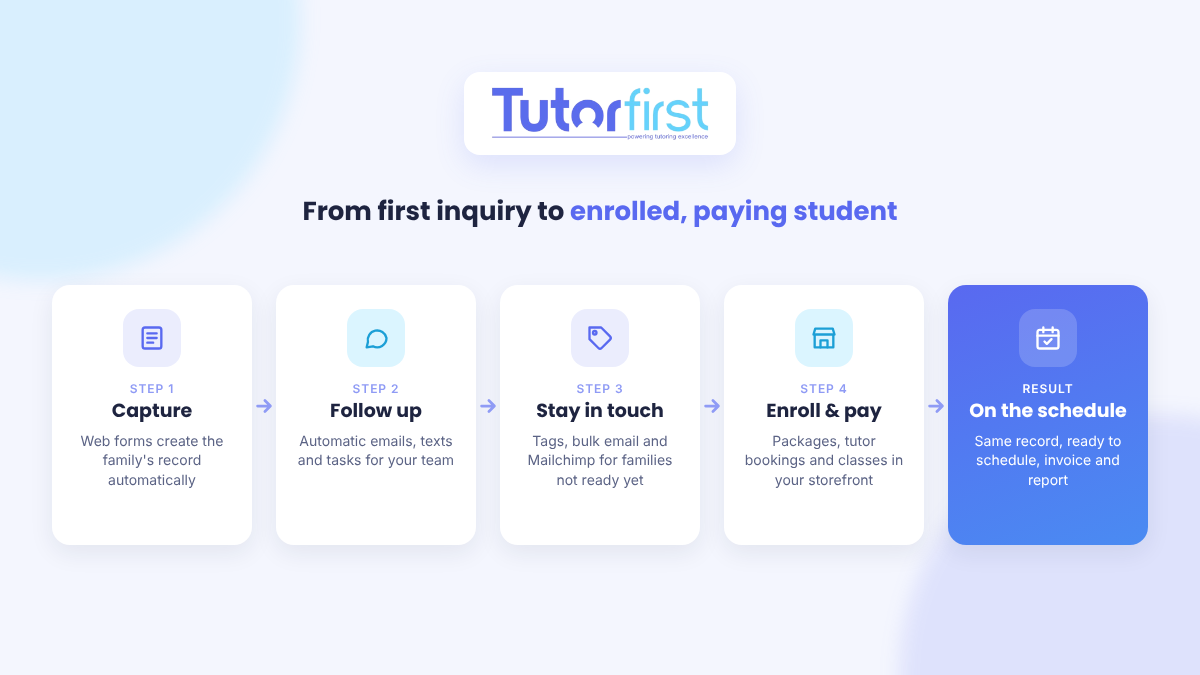
A tutoring CRM (customer relationship management system) captures every inquiry from your website, follows up with families automatically, and lets them sign up and pay without a week of back-and-forth emails. For a tutoring business with several tutors and office staff, it’s the difference between leads slipping through the cracks and a steady flow of new students onto the schedule.
This guide walks through each step from first inquiry to first paid session, and the TutorFirst tools that handle each one.
Who a tutoring CRM is for
A CRM earns its keep when more than one person touches a new family. That means tutoring companies, tutoring centers, test-prep businesses and agencies that have:
- Several tutors whose schedules need filling
- Office or admin staff answering inquiries
- Packages, classes or programs to sell, not just one-off hours
- A steady stream of new leads from a website, ads or referrals
If you’re a solo tutor with a handful of regular students, this is more system than you need. A calendar and a simple invoicing tool will do. TutorFirst is built for businesses with a team.
Step 1: Capture every inquiry automatically
Most leads are lost before anyone replies: a contact form lands in an inbox nobody checks, or someone retypes the details into a spreadsheet days later. TutorFirst WebForms fix that at the source.
You build the form in TutorFirst, copy a snippet of code, and paste it onto your website. When a family fills it in, the customer and student records are created for you, with no typing or data entry. You can keep forms short or ask for more detail, set a custom thank-you page that tells families what happens next (for example, “we’ll call you within 24 hours”), and get an email with every submission.
There are separate forms for new customer enrollment, for adding a student to an existing family, and for checkout in your online store, so each one asks only for what you need.
Step 2: Follow up before they call someone else
Parents looking for a tutor often contact several businesses at once, and the first one to reply has the advantage. TutorFirst gives your team several ways to respond quickly:
- Email templates that can send automatically when a record meets certain criteria, such as a new inquiry arriving.
- Text messages to leads and students, with templates. Recipients must be able to opt out, and texting carries an extra fee.
- Tags to mark where each lead stands, such as “new inquiry,” “assessment booked” or “spring campaign.”
- Tasks assigned to team members, with deadlines, so every follow-up call has an owner.
Step 3: Stay in touch with families who aren’t ready yet
Not every inquiry signs up this week. Some families come back before exams or at the start of a new term. Keep them warm without extra work:
- Bulk emails and texts sent straight from TutorFirst, targeted by tag, for offers and announcements.
- The Mailchimp integration, which sends new and updated student, customer and tutor records from TutorFirst to the Mailchimp lists you choose. Those updates can trigger your Mailchimp automations, so a new web form inquiry can start a welcome email series on its own.
Step 4: Make it easy to say yes
The fewer steps between “this looks good” and “booked,” the more families enroll. The MarketPlace Storefront is an online store that runs on your own website under your own brand. You publish it with a code snippet, and you can use it to:
- Sell tutoring packages, such as a five-hour bundle, to new or existing customers
- Let families book a tutor directly from a profile with a photo, bio and calendar, with notice rules you set
- Sell single sessions you’ve already scheduled
- Sell classes and courses, like a test-prep intensive or a week of camp, with a maximum number of students
New families create a login when they buy, a web form collects the details you need, and they pay by card at checkout. Both the family and the tutor are notified of new bookings, and every storefront sale is tagged so you can see how much business it brings in.
If you need a signed agreement before tutoring starts, Contracts lets you send documents for electronic signature, and the signed copy is saved to the family’s record.
Step 5: Recruit tutors the same way
More students means you need more tutors. Tutor registration forms work like enrollment forms: put one on your careers page and each application becomes a staff record in TutorFirst. You can create a different form for each position you’re hiring for.
Before and after a tutoring CRM
| Situation | Inbox and spreadsheets | With a tutoring CRM |
|---|---|---|
| A parent fills in your contact form at 9 p.m. | Sits in an inbox until someone checks it | Records are created and a welcome email can go out automatically |
| A lead needs a follow-up call | Someone has to remember | A task is assigned to a team member with a deadline |
| A family isn’t ready to start | Forgotten until they call back, if they do | Tagged and kept on your email list for the next term’s offer |
| A family wants a 10-hour package | Emails about price, then an invoice, then waiting for payment | They buy it online and pay by card |
| You run a summer test-prep class | Track sign-ups and payments by hand | Sell seats in your storefront with a capacity limit |
| You need more tutors | Applications scattered across email | Each application becomes a staff record |
What to look for in a tutoring CRM
- Web forms that create records automatically, with no retyping
- Automatic follow-up by email, and by text if your families prefer it
- Tags and tasks so a team can share leads without dropping them
- A connection to the email marketing tool you already use
- An online store on your own site for packages, bookings and classes
- Card payments at checkout
- The same system for scheduling and billing once the family enrolls, so nothing is entered twice
That last point matters most. A standalone CRM gets the family to “yes,” then someone copies their details into the scheduling and billing system. When the CRM is part of your tutoring management software, the record created by the web form is the same one that gets scheduled, invoiced and reported on.
Frequently asked questions
What is a tutoring CRM?
It’s software that tracks every prospective family from first inquiry to enrollment. It captures leads from your website, organizes follow-up, and keeps in touch with families until they sign up. In TutorFirst, the CRM tools are built into the same system that handles scheduling, billing and payroll.
Do solo tutors need a CRM?
Usually not. With a small number of students, a calendar, a contact list and simple invoicing are enough. A CRM pays off once you have staff handling inquiries and several tutors’ schedules to fill.
Can families pay for tutoring online?
Yes. Through the MarketPlace Storefront, families can buy packages, book tutors, buy single sessions or sign up for classes, and pay by card at checkout. Existing customers can also log in and pay their invoices.
Does TutorFirst work with Mailchimp?
Yes. New and updated records in TutorFirst are sent to the Mailchimp lists you choose, and those updates can trigger your Mailchimp automations. If you’d rather not use Mailchimp, you can send individual and bulk emails directly from TutorFirst.
Want to see how this would work for your tutoring business? Explore TutorFirst’s sales and marketing tools or book a demo.