
Tutor Scheduling Software: Simplify Lesson Booking
November 10, 2026 2026-11-10 18:39Tutor Scheduling Software: Simplify Lesson Booking
Tutor Scheduling Software: Simplify Lesson Booking
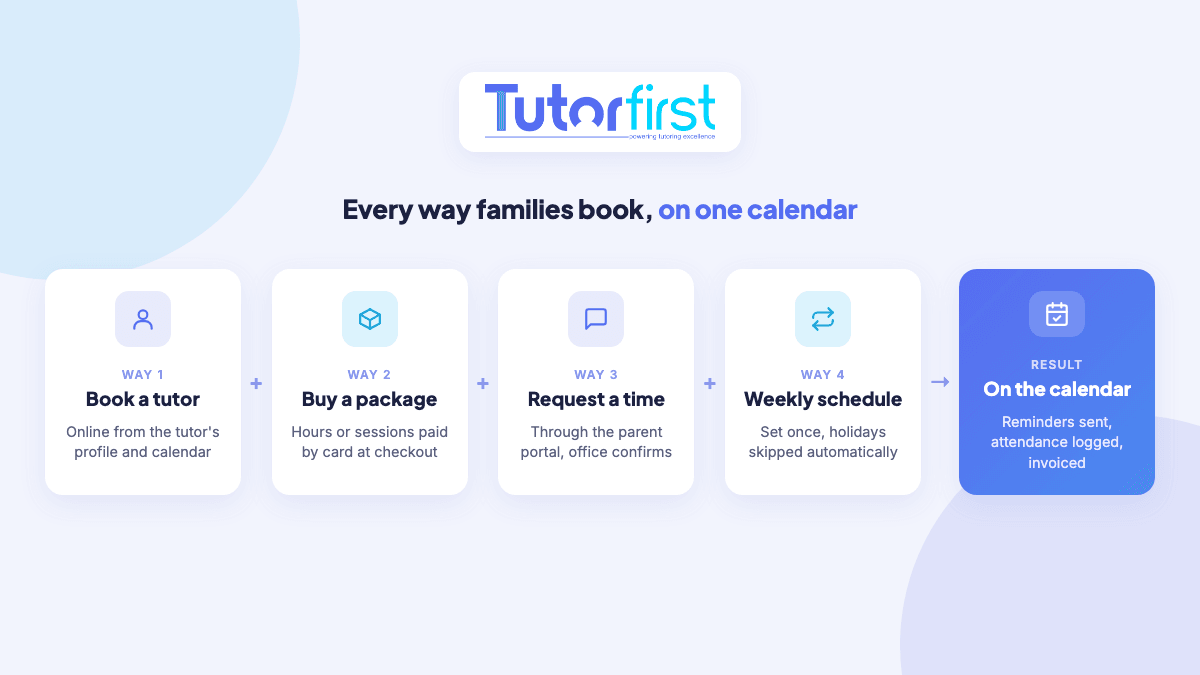
Tutor scheduling software simplifies lesson booking by letting families book or request sessions online, checking tutor availability for you, and sending confirmations and reminders automatically. Instead of trading emails and texts to find a time, the family picks a slot that works, the tutor is notified, and the session lands on the calendar ready to be tracked and billed.
This guide covers where lesson booking breaks down for tutoring businesses, the different ways families can book with software, and what to look for before you choose a tool.
Why booking lessons by hand eats your week
Booking one lesson sounds simple. In practice, every booking is a short negotiation, and a growing business has dozens of them a week:
- Back-and-forth: a parent asks for Tuesday, the tutor can only do Wednesday, and three messages later nobody is sure what was agreed.
- Double-booking: availability lives in each tutor’s head and phone, so two families get offered the same slot.
- No-shows: without reminders, families forget sessions, and tutors are paid for time nobody used.
- Payment chasing: the lesson happens first and the invoice follows, sometimes weeks later.
- After-hours inquiries: parents often look for tutoring in the evening, when nobody is in the office to reply.
Four ways families can book with scheduling software
Not every family books the same way. Some want to pick a tutor and a time themselves, some buy a block of hours up front, and some just want the same slot every week. Good tutor scheduling software supports all of them. Here’s how each works in TutorFirst.
1. Book a tutor directly online
The MarketPlace Storefront runs on your own website under your own brand. Families can open a tutor’s profile, with a photo, bio and calendar, and book a session directly. You set notice rules, so nobody books a lesson for twenty minutes from now. New families create a login when they book and pay by card at checkout, and both the family and the tutor are notified.
2. Buy a package or a scheduled session
Many tutoring businesses sell hours in bundles, such as a five-hour package. Families can buy packages in the storefront, or buy a single session you’ve already put on the schedule. Payment happens at booking, not weeks after the lesson.
3. Request a session through the customer portal
Existing families can request sessions on the days and times that suit them through the customer portal. An admin assigns a tutor and confirms, and the session can be linked to the student’s existing schedule. Requests arrive in the system instead of your inbox, so none of them get lost.
4. Set up a recurring schedule once
Most tutoring is the same student with the same tutor at the same time each week. Rather than booking every lesson, you create a schedule: pick the days, times and durations, and the sessions are created for you. Holidays and closure days are skipped automatically, and if the family’s time changes, you update the whole schedule at once. See student scheduling and attendance.
When the business books the tutor for the family
Sometimes the family tells you what they need and expects you to find the tutor. That’s where most office time goes, and where software helps most:
- Intelligent Tutor Match filters tutors by availability (including their linked Google Calendars), subject, distance, specialist skills, preferred student ages and rating.
- Schedule Bid sends the job to every qualified tutor at once. Tutors accept or decline, and you choose who gets it, instead of texting tutors one at a time.
What happens after a lesson is booked
Booking is only the start. The real time savings come from what the software does next without anyone touching it:
- Reminders go out by email before each session.
- Online lessons get a meeting link automatically. TutorFirst works with Pencil Spaces and Lessonspace, and the whiteboard link is sent with the reminders.
- Attendance is logged when the tutor closes out the session, so there are no timesheets to collect.
- Invoices come from the schedule, either in advance or in arrears, and approved sessions flow into tutor pay.
Booking by message vs. booking with software
| Situation | Email and text | Tutor scheduling software |
|---|---|---|
| A parent wants a lesson at 9 p.m. on a Sunday | Waits until Monday for a reply | Books a tutor online and pays at checkout |
| A family wants the same time every week | Book each lesson one by one | Create one recurring schedule that skips holidays |
| A family wants to change one session | Messages between parent, office and tutor | Parent requests a new time in the portal, admin confirms |
| A new student needs a chemistry tutor | Text tutors until someone says yes | Send a Schedule Bid to qualified, available tutors |
| A lesson is tomorrow | Hope everyone remembers | Automatic email reminder, with the online link if needed |
| The month ends | Work out who owes what | Invoices and tutor pay come from the same session records |
What to look for in lesson booking software
- Online booking on your own website, under your own brand
- Notice rules, so families can’t book at the last minute
- Card payment at booking, plus packages of hours
- Recurring schedules that skip holidays and can be changed in bulk
- A portal where existing families can request changes
- Availability checks against tutors’ real calendars
- Automatic reminders and online meeting links
- Booking, billing and tutor pay in one system, so nothing is entered twice
Frequently asked questions
Can parents book tutoring lessons online?
Yes. With TutorFirst’s MarketPlace Storefront, parents can book a tutor from the tutor’s profile and calendar, buy packages or buy scheduled sessions, and pay by card at checkout. Existing families can also request sessions through the customer portal.
How do I stop last-minute bookings?
Set notice rules. When families book a tutor through the storefront, they can only choose times that meet the minimum notice you set.
Can families pay when they book?
Yes. Storefront bookings and packages are paid by card at checkout. For regular weekly students, invoices can be created in advance from the schedule or after the sessions take place.
Is tutor scheduling software worth it for a solo tutor?
It depends on how much time booking takes you. A solo tutor with a few regular students can get by with a calendar and simple invoicing. Once booking, reminders and billing start eating into teaching time, scheduling software is worth it, whether you tutor solo or manage a team of tutors.
Want to see how online booking would work for your tutoring business? Explore TutorFirst’s scheduling tools or book a demo.